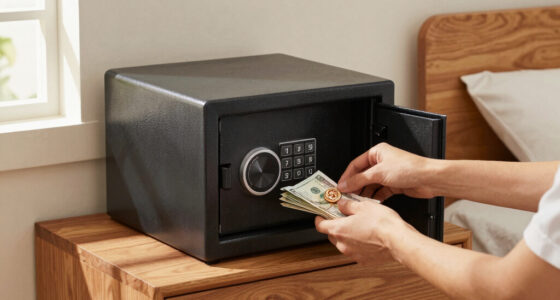

This checklist is for investors who want to make everyday access to financial accounts and related records more deliberate. It covers a mix of account sign-in tools, screen privacy, portable file storage, and paper handling. Use it to spot practical gaps in how you protect account access and information.

Get smart everyday buys delivered free with Prime
- Fast, free delivery on millions of items
- Prime Video, Amazon Music and more included
- Member-only deals all year
The sections are organized by the role each item can play: strengthening sign-in, keeping account details less visible, and handling files in digital or paper form. The picks range from a hardware security key and password manager guide to an encrypted USB drive, shredder, and locking file box. Match each slot to a real need in your routine.
Start by identifying where you sign in, what records you keep, and how you transport or dispose of them. Then check the product details for compatibility, fit, capacity, and setup requirements before choosing. Confirm the details that affect your setup rather than assuming every item works with every device or account.
Hardware Security Key
A hardware security key can add a physical step to account sign-in, making it a distinct part of an account security routine. The Yubico YubiKey Bio C (FIDO Edition) is identified as a USB-C biometric security key, so the connector and sign-in support are central checks. Confirm FIDO support for the services you intend to use, and review how biometric enrollment and backup access work before relying on it.
A common buying mistake is treating a security key as universally compatible. Check that your computer or other device has the required USB-C port, and verify that the account’s sign-in flow accepts this type of key. Consider how you will sign in when the key is unavailable, such as while traveling or after changing devices. A key can fit into a strong routine only when you have a workable recovery path and know where it will be kept. Plan for access recovery and key storage as part of setup.
Before choosing, compare the key’s enrollment process with the devices you regularly use. If you switch between platforms, verify support on each one rather than assuming the same experience everywhere. Check device and service compatibility first.
What to look for:
- USB-C port availability on your regular devices
- FIDO security key support for each target account
- Biometric enrollment and sign-in setup steps
- A backup sign-in and account recovery plan
- Storage that keeps the key accessible when needed
Yubico YubiKey Bio C (FIDO Edition) – USB-C Biometric Security Key

The YubiKey Bio C offers passwordless multi-factor authentication using biometric fingerprint verification and PIN fallback. Compatible with multiple operating systems and major online services, it is durable, tamper-resistant, water-resistant, and requires no batteries or network connectivity.
Pros:
- Biometric fingerprint authentication for enhanced security
- Compatible with major OS and online services like Google and Microsoft
- Durable, water-resistant, and tamper-resistant design
- No batteries or network required for operation
Cons:
- Limited to FIDO protocols, no OTP generation
- Requires USB-C port, may not be compatible with older devices
- Higher price point compared to non-biometric security keys
Best for: people whose accounts support FIDO security keys and who use USB-C devices
Not ideal for: people whose devices or services do not support this key type
Bottom line: Choose it only after confirming service support, device fit, and a backup access plan.
Password Manager
A password manager is a place to organize account credentials, which can help make sign-in routines more manageable. The listed pick is a beginner’s guide to password managers, so treat it as an introduction rather than assuming it is password-management software. Know what the item is before buying: the title describes a guide, not a named password manager application.
A common mistake is choosing a guide while expecting it to create, store, or sync passwords. Read the full listing to confirm its format and contents, then decide whether you need learning material, a software service, or both. If your goal is to adopt a manager, consider how it fits the devices you use and how account recovery would work. Separate guidance from the tool so the purchase matches the job.
Check whether the guide explains the topics you want to learn, such as setup and everyday use, and whether its instructions fit your devices and account habits. The product title is truncated, so verify the complete title and listing before deciding. Review the full listing and confirm the format before purchase.
What to look for:
- Whether the listing is a book, digital guide, or another format
- The complete title and description, since the supplied title is truncated
- Coverage of setup and routine password manager use
- Guidance relevant to your devices and account habits
- Whether you also need a separate password manager service
Password Managers Unlocked: A Beginner’s Guide to Password Managers, Passkeys, a

A beginner’s guide to password managers, passkeys, and online security. The source provides no further product details.
Pros:
- Well-reviewed by owners
- Fits this checklist slot
Cons:
- Availability can vary
Best for: readers who want introductory guidance before choosing a password manager
Not ideal for: shoppers looking for password manager software itself
Bottom line: Confirm the item’s format and contents, and pair it with software if that is what you need.
Privacy Screen Filter
A privacy screen filter is intended to limit what can be seen from the side of a display, making size and screen shape key selection details. This pick is described as a 3M Gold Frameless Privacy Filter for a 14-inch widescreen laptop with a 16:9 aspect ratio. Match the screen dimensions and aspect ratio to your laptop before ordering.
A frequent buying mistake is matching only the advertised diagonal size. Laptop display dimensions, bezel design, and attachment style can affect fit, and the supplied title does not provide every measurement or installation detail. Check your laptop’s exact display specifications and compare them with the complete filter listing. If you move between laptops, verify the fit for each one; a filter sized for one screen may not suit another. Verify the full fit details rather than relying on the diagonal alone.
Also consider when and where you use the laptop, and whether the filter’s attachment approach works with your display. Confirm that the full listing matches your screen’s widescreen format and that the frameless design suits your setup. Check attachment and screen shape together before buying.
What to look for:
- A 14-inch display measurement that matches the listing
- A 16:9 widescreen aspect ratio
- Exact screen dimensions and bezel details
- The filter’s attachment and installation method
- Compatibility with the specific laptop model
3M Gold Frameless Privacy Filter for 14" Widescreen Laptop, 16:9 Aspect Ratio

The 3M Gold Privacy Filter keeps confidential information private on 14-inch widescreen laptops, allowing clear visibility for the user while obscuring the screen from side views with a vivid golden tint. It is reversible, easy to apply with an optically clear adhesive, and designed for privacy and clarity.
Pros:
- Provides high-level privacy with a vivid gold tint
- Reversible design offers flexibility in appearance
- Easy to apply with optically clear adhesive
Cons:
- Limited to 14-inch widescreen laptops
- Gold tint may alter screen color perception
- Reversible feature might be unnecessary for some users
Best for: owners of a 14-inch 16:9 widescreen laptop with matching fit details
Not ideal for: people with another screen size, aspect ratio, or incompatible attachment setup
Bottom line: Verify the laptop’s exact display and attachment details against the complete listing.
Encrypted USB Drive
An encrypted USB drive can provide a portable place for files, so its capacity, connection, and access controls matter. The Apricorn Aegis Secure Key 3 NX listing names a 32GB drive with 256-bit encryption and USB 3.0. Check capacity and connection against the files you intend to carry and the devices you use.
A common buying mistake is assuming an encrypted drive will open smoothly on every device or that its security setup needs no planning. Confirm the ports available on your computers and review the drive’s unlock and setup instructions. Decide which files belong on portable storage and how you will protect access credentials. If you need to move files between different operating systems or devices, check the listing for supported formats and compatibility. Plan access before loading files so the drive is usable when needed.
Also consider how you will store and update the drive, and whether 32GB fits your intended file set. The product title identifies USB 3.0, but your workflow may involve adapters or devices with different ports. Verify the connection path and usable capacity for your setup before purchase.
What to look for:
- Whether 32GB suits the files you plan to carry
- USB 3.0 support and available ports on your devices
- The drive’s unlock and security setup instructions
- Compatibility with the devices and file formats you use
- A safe method for storing access credentials
Apricorn Aegis Secure Key 3 NX 32GB 256-Bit Encrypted USB 3.0 Flash Drive
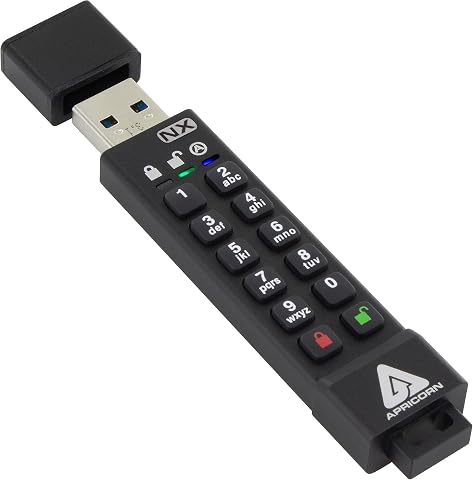
The Apricorn Aegis Secure Key 3 NX is a 32GB encrypted USB 3.0 flash drive with 256-bit AES encryption, FIPS 140-2 Level 3 validation (pending), and separate admin and user modes. It offers high-speed data transfer and robust security features suitable for sensitive data protection.
Pros:
- High-level 256-bit encryption ensures data security
- Fast read and write speeds for quick data transfer
- Compatible with multiple operating systems
- FIPS 140-2 Level 3 validation adds compliance assurance
Cons:
- Pending FIPS validation may delay full security certification
- Limited storage capacity for large data needs
- No mention of hardware durability or waterproof features
Best for: people who need portable file storage and have compatible USB connections
Not ideal for: people needing more capacity or devices without a compatible connection path
Bottom line: Confirm capacity, device compatibility, and the unlock process before storing sensitive files.
Document Shredder
A document shredder is useful for handling paper records you no longer need to keep. This pick is described as a commercial office cross-cut shredder with an automatic oiler, so the listing’s capacity and operating requirements deserve close attention. Check the full specifications to see whether its size and use profile fit your space and workload.
A common mistake is choosing a commercial-style unit without checking where it will go or how it will be maintained. Confirm the shredder’s dimensions, power requirements, accepted materials, and operating limits from the complete listing. Cross-cut describes the stated cut style, but review the product details to understand its documented capabilities and handling instructions. The automatic oiler is part of the title; verify its maintenance needs and what supplies or steps are required. Review placement and upkeep before committing.
Think about the volume of papers you expect to process and how often you will use the machine. Check whether it can handle your documents as prepared, and follow the manufacturer’s instructions for operation and maintenance. Match the unit to your paper routine rather than assuming a commercial label guarantees a fit.
What to look for:
- Dimensions and a suitable location for the unit
- Power requirements and operating limits
- Accepted paper types and preparation instructions
- Maintenance steps for the automatic oiler
- Capacity suited to your typical document volume
4005 Cross Cut Commercial Office Paper Shredder with Automatic Oiler, Continuous

This heavy-duty cross-cut shredder is designed for commercial use, handling 37-39 sheets at a time with a large 44-gallon bin. It features automatic oiling, jam prevention, and continuous operation, making it suitable for offices with 20-25 users.
Pros:
- High capacity shredder suitable for large office environments
- Automatic oiler and jam prevention features enhance usability
- Continuous operation allows for efficient shredding
Cons:
- Very heavy and bulky, may require sturdy setup space
- Requires 20AMP power outlet, limiting placement options
- No price information available
Best for: people with regular paper disposal needs and room for a commercial office shredder
Not ideal for: people with limited space or occasional, low-volume shredding needs
Bottom line: Check dimensions, capacity, and maintenance details against your document routine.
Locking File Box
A locking file box can help keep paper records together while moving or storing them. This pick is described as a rolling file box with wheels, measuring 19.2 inches long, made from aluminum alloy, and identified as portable. Check the complete dimensions and interior layout against the folders and records you plan to keep inside.
A common mistake is assuming that a lock or rolling design makes a box suitable for every storage situation. Review the full listing for lock details, interior measurements, handle design, and how the wheels attach or operate. If you expect to carry files over thresholds or stairs, consider whether a wheeled box fits those routes and how you will lift it when necessary. Test the route and storage fit using the product dimensions and your own setup.
Think through where the box will be stored and how frequently you will move it. Confirm that the stated 19.2-inch length works with your shelves or transport space, and check the other measurements before purchase. The title names aluminum alloy but does not establish every construction detail, so consult the full listing for those specifics. Verify the lock and interior fit for the records you keep.
What to look for:
- Full exterior dimensions, including width and height
- Interior dimensions that fit your folders and documents
- Lock type and instructions for securing the box
- Wheel and handle details for your intended routes
- Storage location and lifting needs when wheels are unsuitable
Locking Rolling File Box with Wheels, 19.2" L Portable Aluminum Alloy Storage Ca

This portable aluminum storage case features dual combination locks, multiple compartments, and a durable, corrosion-resistant design. Equipped with wheels and a telescoping handle, it offers secure and easy transport for documents and office supplies, making it ideal for home, office, or travel use.
Pros:
- Secure with dual combination locks for confidentiality
- Durable aluminum construction resists corrosion and impact
- Easy to transport with wheels and telescoping handle
- Multiple compartments for organized storage
Cons:
- Heavy at 6.5 kg, may be cumbersome for some users
- Limited color options (only black shown)
Best for: people who want a wheeled file box and have records that fit its interior
Not ideal for: people needing a different size or a box for routes where wheels are impractical
Bottom line: Confirm interior fit, full dimensions, and lock details before organizing records in it.
Build your checklist around the most immediate gap: account sign-in and password habits first, then screen privacy and file handling based on how you work. For each item, confirm its format, compatibility, and fit before buying. Prioritize the tools you will use regularly and avoid purchasing a category whose role does not match your need.
You do not need to change everything at once. Start with one practical improvement, learn how it fits your routine, and revisit the rest of the checklist as your device and record-keeping needs become clearer. A steady, informed approach can make account and document routines easier to manage.
Fall Picks

Samsung Essential S3 27-Inch FHD Curved Monitor (S36GD)
As an affiliate, we earn on qualifying purchases.